Group-to-List Synchronization
Map each Nextcloud group to a dedicated AutoPhish target list—create a new list straight from Nextcloud or connect an existing one. Departments, locations and teams become ready-made simulation audiences.
Install the AutoPhish app on your Nextcloud server, map your groups, and run realistic phishing simulations with built-in security awareness training. New hires are covered automatically, leavers drop out, and nobody touches a CSV again.
Organizations run Nextcloud because they want to own their data and their infrastructure. Yet most phishing simulation tools assume Microsoft 365 or Google Workspace and leave everyone else exporting user lists by hand. Those lists go stale within weeks: new colleagues never get tested, people who left still receive simulations, and reports stop reflecting your real organization. AutoPhish closes that gap with a native Nextcloud integration, so your phishing tests always reach the people who are actually on your team.
Install "AutoPhish: Phishing Simulation & Training" from the Nextcloud App Store via Apps administration. It supports Nextcloud 32 to 35.
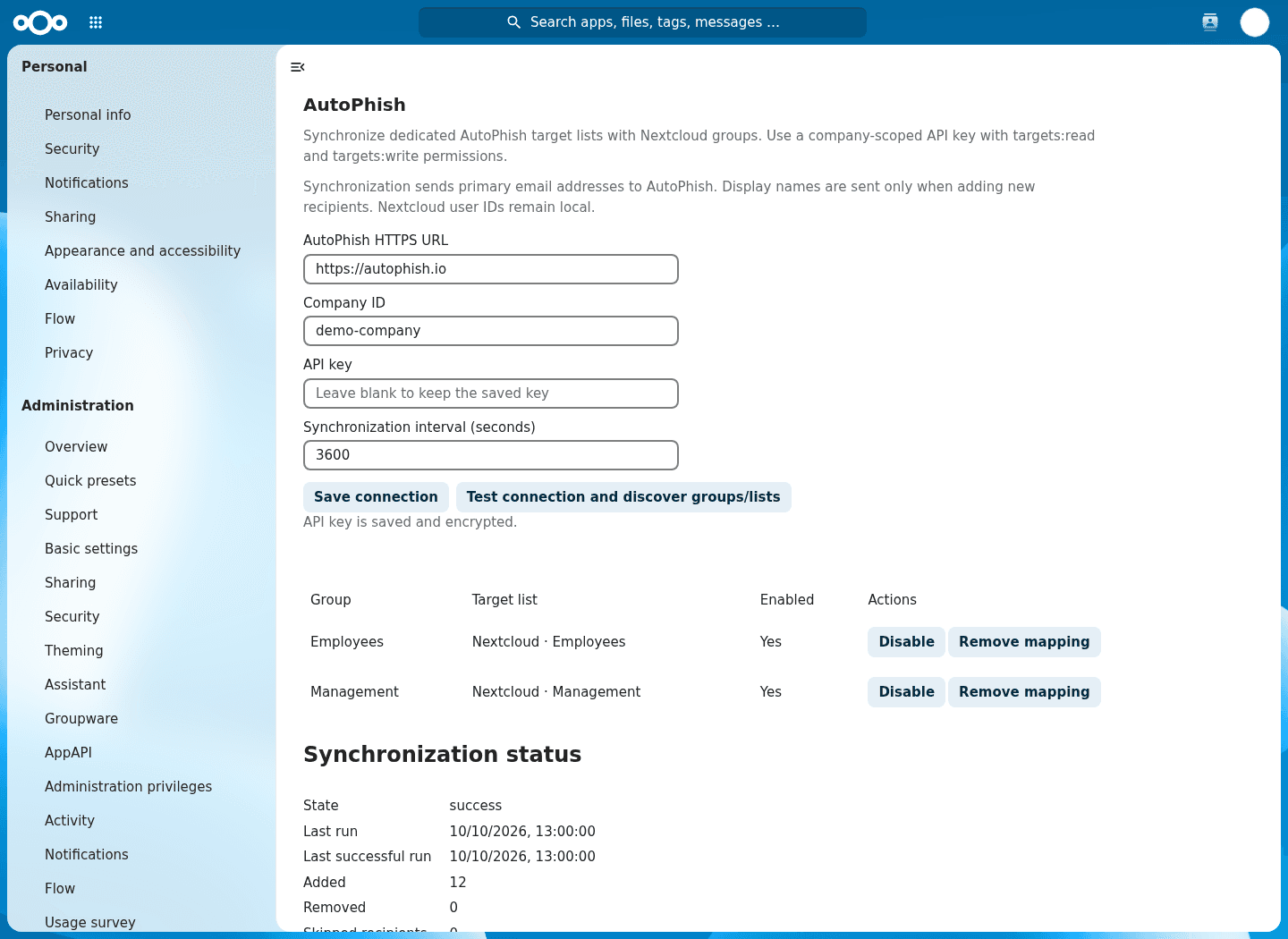
Create an API key with the targets:read and targets:write scopes in AutoPhish, then enter it with your company ID under Administration settings → AutoPhish.
Map each Nextcloud group to its own AutoPhish target list. Once the first sync finishes, launch campaigns and review results in AutoPhish.
Map each Nextcloud group to a dedicated AutoPhish target list—create a new list straight from Nextcloud or connect an existing one. Departments, locations and teams become ready-made simulation audiences.
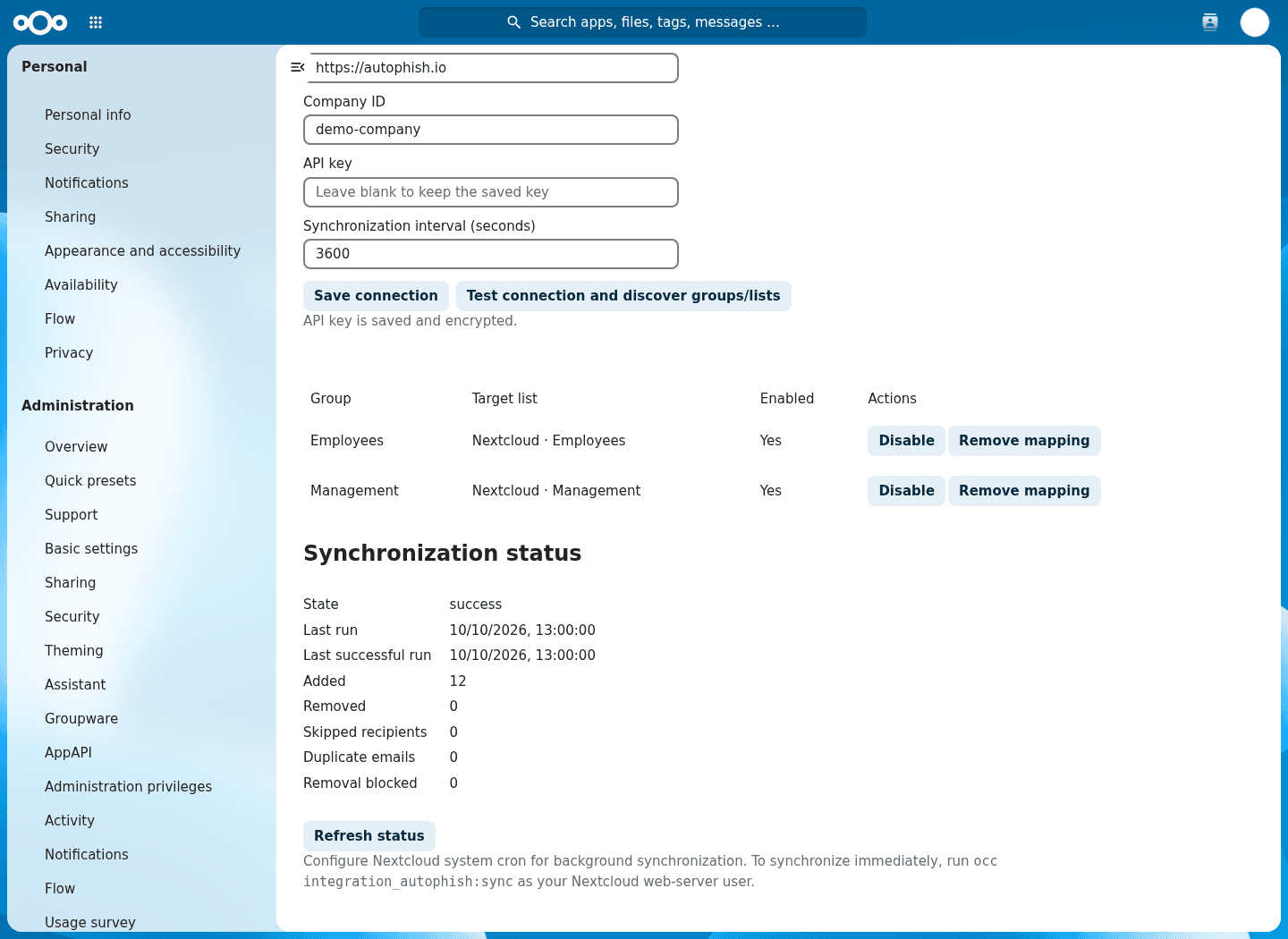
Choose a sync interval from 5 minutes to 24 hours via Nextcloud background jobs, or trigger a sync manually with an occ command. Last run, last success and membership counts are visible in the admin settings.
Stale memberships are only removed after complete reads and verified additions. Failed reads or invalid addresses block removals instead of emptying a list, and the app never deletes targets company-wide.
Only primary email addresses and, for new recipients, display names leave your server. User and group IDs stay in Nextcloud, there is no telemetry, and the API key is encrypted with Nextcloud's crypto service.
The Nextcloud app keeps your recipients current. Everything else happens in AutoPhish—the automated phishing simulation and security awareness training platform for teams that want results without the admin overhead.
Nextcloud keeps your files under your control—AutoPhish keeps your awareness program in the EU. Our servers are hosted in Germany, all data is processed in the EU, and we sign DPAs on request. The Nextcloud app itself is open source under the AGPL, so your administrators can inspect exactly what it sends before they enable it.
See how AutoPhish automates realistic phishing simulations end to end.
Learn moreSecurity awareness courses and micro-training for every employee.
Learn moreRun simulations without exposing individual employee results.
Learn moreEvidence for NIS2, DORA and ISO 27001 audits.
Learn moreSign up free — no credit card. Try Pro free for 7 days when you're ready.