Gophish alternative

Move from Gophish in 10 minutes

Keep the groups, email templates and sending profiles you already built. AutoPhish imports them from a Gophish export, then takes over hosting, landing pages, training and reporting.

Already have an account? The importer is under Settings → Import from Gophish.

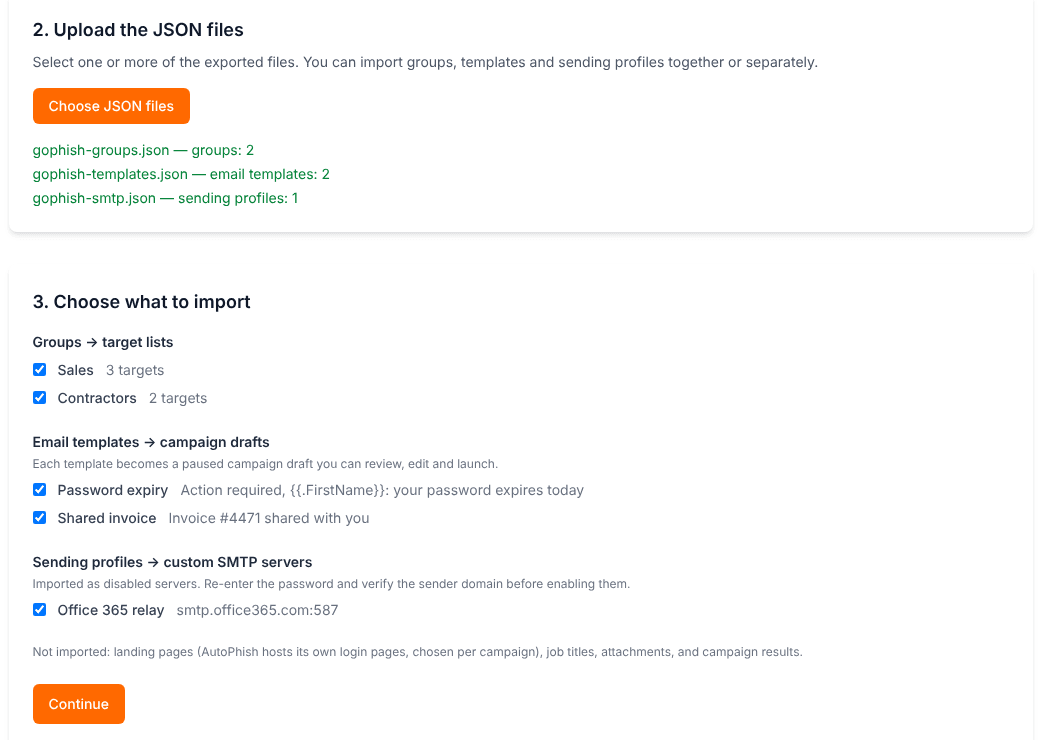
AutoPhish Gophish importer showing groups, templates and sending profiles ready to import

You already run phishing simulations. You shouldn't have to run the server too.

Gophish, FiercePhish and the Simple Phishing Toolkit are capable open-source frameworks, but every campaign still depends on you: patching and exposing the admin server, writing templates and landing pages by hand, and exporting results into spreadsheets for training follow-up. AutoPhish keeps the control you are used to and removes the upkeep.

How the switch works

  1. Export from Gophish

    Run three curl commands against your Gophish API. Your API key stays on your machine — you only upload the resulting JSON files.

  2. Upload and verify domains

    Pick the groups, templates and sending profiles to bring over. AutoPhish shows which target domains still need verification and lets you verify them by email or DNS right there.

  3. Review and launch

    Groups become target lists, templates become paused campaign drafts. Choose a target list, preview, and start your first AutoPhish campaign.

What carries over — and what gets easier

Imported from Gophish

  • Groups → target lists, including first and last names
  • Email templates → campaign drafts, with the Gophish URL variable turned into a tracked call-to-action and first and last names preserved
  • Sending profiles → custom SMTP servers (imported disabled; the password comes along only if you choose)
  • Re-import any time: existing lists are completed, never duplicated

Handled by AutoPhish instead

  • Landing pages → hosted login pages and microtraining, chosen per campaign
  • Hand-written templates → AI-generated emails per campaign or per recipient, still fully editable
  • Admin server → nothing to host, patch or expose to the internet
  • Spreadsheet reporting → dashboards, reports and automatic follow-up training

Self-hosted toolkit vs. AutoPhish

Gophish, FiercePhish and SPT are open-source frameworks you host yourself. Here is what changes when you move.

TopicSelf-hosted toolkitAutoPhish
Hosting and updatesYou run, patch and secure the serverFully managed
Email contentWrite and maintain templates yourselfAI-generated or imported, editable
Landing pagesClone and maintain HTML yourselfHosted login pages included
Awareness trainingNot includedMicrotraining right after a click
ChannelsEmailEmail, SMS and QR codes
Target listsCSV uploadCSV, Gophish import, Microsoft 365 and Active Directory sync
ReportingPer-campaign resultsCompany-wide dashboards and reports

Questions from teams moving off Gophish

Do I have to share my Gophish API key?
No. You run the export commands yourself and upload only the JSON files. SMTP passwords in the export stay in your browser unless you choose to import them; imported passwords are stored encrypted.
Which Gophish data is imported?
Groups and their targets, email templates and sending profiles. Landing pages, campaign results, job titles and attachments are not imported — AutoPhish provides its own hosted login pages and training instead.
Why do I need to verify my domains?
AutoPhish only sends simulations to email domains you have proven you own. The importer lists every target domain and lets you verify it by email or DNS before importing; targets on unverified domains can be added later by importing again.
What happens to Gophish template variables?
The Gophish URL variable becomes the tracked AutoPhish link, and the FirstName and LastName variables keep personalising each email. Variables AutoPhish does not support are removed and listed in the import summary.
Can I keep sending through my own mail server?
Yes. Sending profiles are imported as disabled custom SMTP servers, optionally with their password. Verify the sender domain, then enable the server.

Run your first phishing test in 10 minutes.

Sign up free — no credit card. Try Pro free for 7 days when you're ready.